

Price alerts
Price alerts for trading cards
Updated October 21, 2026 · checked against the app and its price data
TCG Vault sends you a notification when a card goes above or below the price you set.
Pick the printing, choose “below” or “above” and a price. TCG Vault compares it with the new TCGplayer or Cardmarket price every day and tells you when the card crosses your line. It works for all 12 games in the app — Pokémon, Magic: The Gathering, Yu-Gi-Oh!, One Piece, Disney Lorcana and more — on iPhone and iPad.
Custom price alerts are part of TCG Vault Premium. Wishlist price drops are free: when a card on your wishlist falls well below its price of the past week, you hear about it without setting anything up.
 Download on iOS
 4.5★ from 107 App Store ratings · iPhone & iPad, iOS 17+
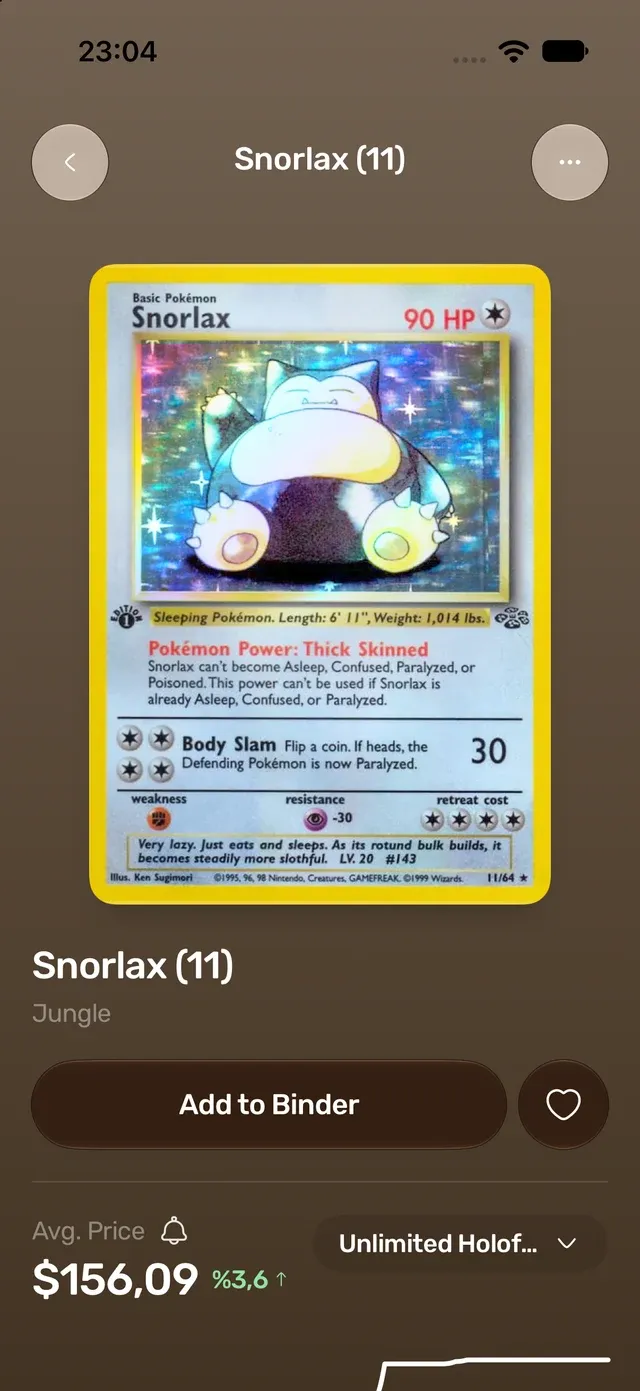
How price alerts work
-
Open a card — from a scan, a search or one of your binders — and tap the bell next to its price. In a binder or set list you can also long-press a card and choose Set Price Alert.
-
Choose the printing, “below” or “above”, and your price. The price is in your marketplace’s own currency: US dollars on TCGplayer, euro on Cardmarket.
-
Every day, after TCGplayer and Cardmarket update, TCG Vault checks your alerts. When a card crosses your line you get one notification, between 9 am and 9 pm your time.
-
An alert fires at most once a week, so a price that hovers around your line doesn’t keep pinging you. Change the price or the direction and the alert is armed again.
Free and Premium
| Notification | When it fires | Plan |
|---|---|---|
| Wishlist price drop | A wishlist card worth $5+ is 15% or more below its median price of the past 7 days (at 10 am your time, at most once every 14 days per card) | Free |
| Custom price alert | The printing you picked goes below or above your price (checked daily, at most once a week per alert) | Premium |
Notifications need to be switched on in the app. Premium is $49.99 a year in the US, or weekly with a 3-day free trial.
Good to know
- Alerts follow ungraded (raw) Near Mint prices. PSA, BGS and CGC graded prices aren’t covered.
- Prices update once a day, so an alert tells you about yesterday-to-today moves, not minute-by-minute swings.
Questions
Is there an app that sends price alerts for Pokémon cards?

Yes. TCG Vault on iPhone and iPad lets you set an alert on any Pokémon card printing — below or above a price — and sends a notification when the TCGplayer or Cardmarket price crosses it. The same works for Magic, Yu-Gi-Oh!, One Piece, Lorcana and the other games in the app.
How often does TCG Vault check prices?
Once a day, right after TCGplayer and Cardmarket update their prices. Notifications go out between 9 am and 9 pm in your time zone.
Do I need Premium for price alerts?
Custom price alerts are part of Premium. Wishlist price-drop notifications are free.
Can I set an alert in euro?
Yes. If your marketplace is Cardmarket, the alert price is in euro; on TCGplayer it is in US dollars. You can change the marketplace in Settings.
Keep reading
- Cardmarket prices TCG Vault scans a card and shows its Cardmarket price in euro — or the TCGplayer price in US dollars, whichever market you buy and sell in.
- Japanese Pokémon cards TCG Vault scans Japanese Pokémon cards and shows their price — on TCGplayer in US dollars and at Yuyu-tei, one of Japan’s largest card shops, in yen.
- Collection value tracker TCG Vault keeps a running total of your card collection, priced every day from TCGplayer or Cardmarket.
- Best Pokémon card scanner apps Nine scanner apps compared on price, free plan, games and ratings.



Never miss a price move
Set an alert on the cards you’re watching. Free to download, alerts with Premium.
Download on iOS 4.5★ from 107 App Store ratings
Still choosing? See 9 card scanner apps compared →